BYOD or Teams Room? How to Choose a Video Conferencing Solution - Using the MaxHub XBar U50 as an Example
Reading time: 12 minutes
Before buying video conferencing technology for a meeting room, you face one fundamental decision: how your people will actually start meetings. The brand, camera resolution and number of microphones are secondary questions. First, you need to choose the workflow. The technology then follows.
There are two paths:
Path A – Room System. The meeting room has a computer with a Microsoft Teams Rooms or Zoom Rooms licence, controlled via a touch panel on the table or a remote control. A person walks in, taps once and the meeting starts. No laptops, no cables, no searching for an HDMI adapter.
Path B – BYOD (Bring Your Own Device). A person brings their own laptop, connects two cables (HDMI to the TV, USB to the camera and audio) and starts the meeting through their own Teams, Zoom or Google Meet. No extra licence and no dedicated PC in the room.
The investment difference:
A BYOD setup for a small to medium meeting room (4-10 people) typically costs €2,000-3,500 for the technology including cabling (excluding the display).
A full Room System in the same room starts from €4,000 for the technology.
This article will guide you through when each path makes sense. Using the specific example of the MaxHub XBar U50, we will show what you get for your money in the BYOD category, including where this solution reaches its limits, so that you do not buy technology your people will not want to use.
If you first want a complete price overview by meeting room type, from Huddle Room to Boardroom, see our video conferencing room pricing guide.
In brief
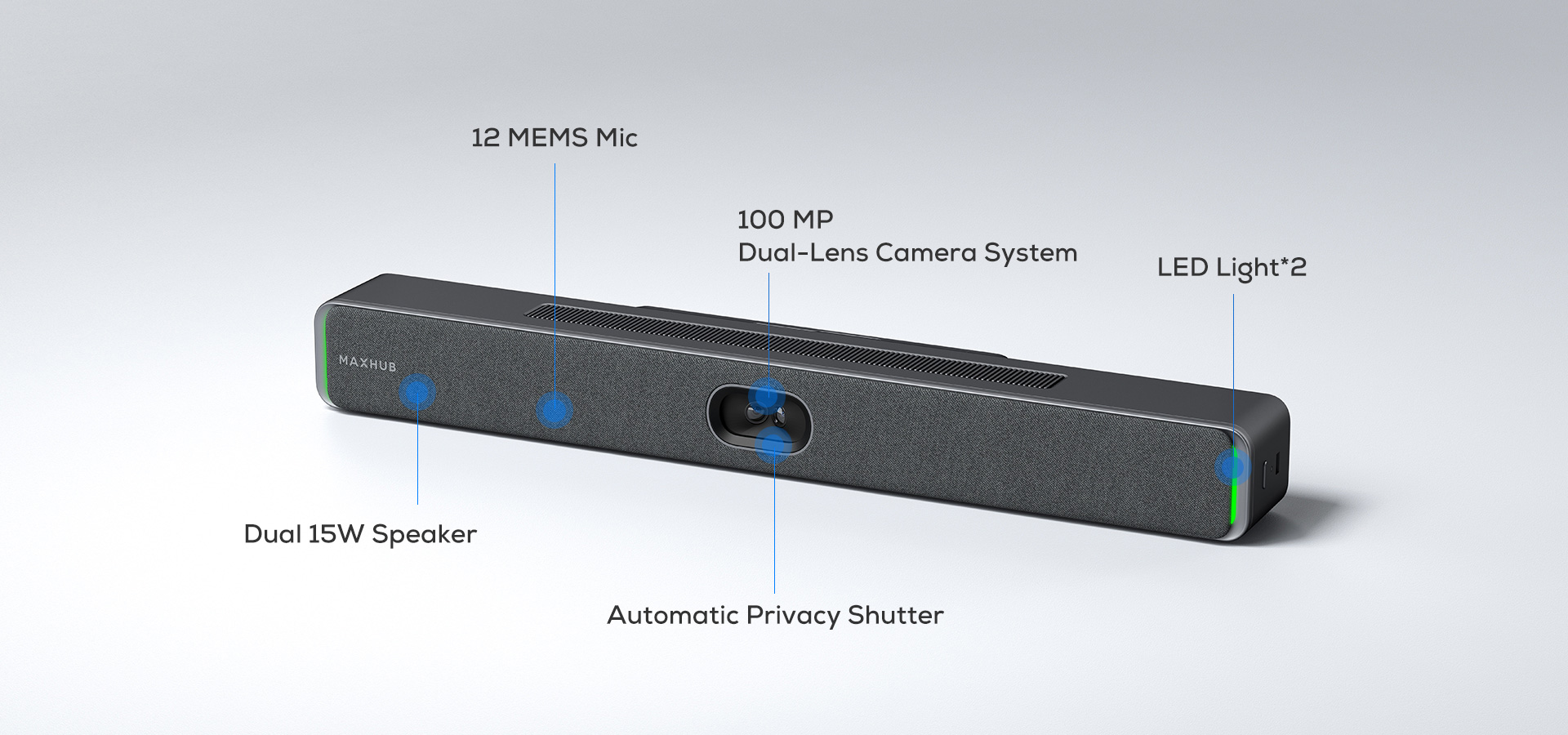
The MaxHub XBar U50 is a USB videobar. It combines a camera, 12 microphones and speakers in one device that connects to a laptop via USB. The video output remains independent. It works with any commercial display, while the laptop controls the display through a standard HDMI cable.
It is suitable if:
- Your people start meetings from their own laptops (BYOD)
- The meeting room has 4-10 people and is up to 6 metres long
- You want high-quality video and audio without monthly licence fees
- You want a solution that does not lock you into one brand ecosystem (you choose the display according to your own needs)
It is not suitable if:
- You want a room where the meeting starts with one tap on a tablet without a laptop (you need a Room System)
- You have a boardroom for 15+ people or a meeting room longer than 8 metres
- You require wireless screen sharing from guest laptops (you need to add a module or choose a solution with built-in wireless functionality)
Price: €1,141 excluding VAT for the videobar itself. A functional BYOD setup with cabling and installation costs €2,000-3,500 excluding the display.
What the MaxHub XBar U50 is and what it is not
The MaxHub XBar U50 is a USB videobar.
Technically, this means it integrates three components – camera, microphones and speakers – into one device that behaves like an external laptop accessory. For Windows or macOS, it appears as a connected webcam, microphone and speaker, only in professional quality and with a range that an integrated laptop webcam does not have.
What this means in practice:
The device does not have its own operating system. Teams or Zoom does not run on it. When entering the room, you need a laptop – either your own or a dedicated PC permanently connected in the room. You start the meeting from that device’s software, while the U50 ensures that you can be seen and heard very well.
This also brings one operational advantage: the U50 works with any video conferencing software – Microsoft Teams, Zoom, Google Meet, Webex, Cisco, Jabra, GoToMeeting. It is not tied to a single platform. From your laptop, you simply start whatever you normally use.
How a meeting works in practice
You enter the meeting room and want to start a call. The workflow looks like this:
- Connecting the laptop to the system. In the basic setup, you connect two cables: HDMI from the laptop to the display for video, and USB-B to the U50 for camera, microphones and audio. In the more comfortable setup, a USB-C docking station sends only one USB-C cable into the laptop, while the dock splits the signal internally.
- Starting the meeting. On the laptop, you open Teams, Zoom, Google Meet or another platform. In the audio and video settings, you select MaxHub U50 instead of the built-in webcam. Windows or macOS remembers this setting and uses it automatically the next time you connect.
The whole process from entering the room to an active meeting typically takes 30-60 seconds.
Why companies choose this workflow:
Every employee knows how to work with their own laptop. They do not need to learn a new tablet interface in the meeting room or manage a new cloud platform. External guests connect just as easily, without needing to be invited into a Teams Rooms structure, which saves time for both the IT department and the guest during one-off meetings.
Where this hits limits in practice:
Meeting quality depends on the performance of the laptop. With older corporate laptops with 8 GB RAM and a weaker processor, Teams or Zoom running together with the U50 can load the system so much that video stutters or audio drops out. This is not a videobar fault. It is a normal characteristic of BYOD setups.

Most common questions before purchase
Does it work with any operating system?
Yes. The U50 appears to the system as a standard USB audio/video device, so it works with Windows 10/11, macOS and Linux without special drivers. The same applies to Chrome OS and Android with USB-C docking support.
Do I need to install any software on the U50?
Not for basic use. You connect via USB and the videobar works. Optionally, the MaxHub Camera Settings application is available, allowing you to adjust camera angles in detail, set manual presets or switch between autoframing modes. You do not need it for regular meetings.
Why does the U50 not have a touch control panel like Teams Rooms devices?
Because it is not a Room System. As a USB peripheral, it does not control the meeting on its own. Volume, call acceptance and microphone mute are handled from the laptop through Teams, Zoom or Google Meet. Adding a touch panel would mean changing the product category and increasing the price by €2,000-3,000, while you would still need a laptop to start the meeting.
Does it work wirelessly?
The videobar itself does not. Connection to the laptop is always wired (USB-B or via a USB-C dock). This is a deliberate choice in this category. The cable ensures that 4K video and 12 microphone channels do not load your corporate Wi-Fi and that the meeting does not start stuttering because of other network traffic.
Wireless screen sharing is handled through a separate module or an additional CMA display with built-in wireless functionality. This is an optional extension, not a requirement.
Is the U50 certified for Microsoft Teams Rooms or Zoom Rooms?
No, and it does not need to be. These certifications apply to full Room Systems that have their own operating system and a running Teams Rooms or Zoom Rooms instance. The U50 is a USB peripheral. It connects to the laptop where Teams or Zoom runs as a standard application. It works equally well with both platforms and with all other video conferencing applications.
How is the firmware updated?
Through the MAXHUB Align application, which supports both local and cloud updates. Locally, you update directly from the laptop connected to the U50. The cloud version allows the IT department to remotely monitor device status and update firmware without being physically present at each unit. This means the U50 is also suitable for a fleet of multiple rooms if your IT team uses the MAXHUB Align platform for centralized device management.
Audio in rooms with glass and concrete
Modern offices have one common problem. Glass partitions, concrete ceilings and hard floors reflect sound and create echo. A laptop microphone captures both your voice and its reflection from the walls, then sends both into the call.
How the U50 solves this:
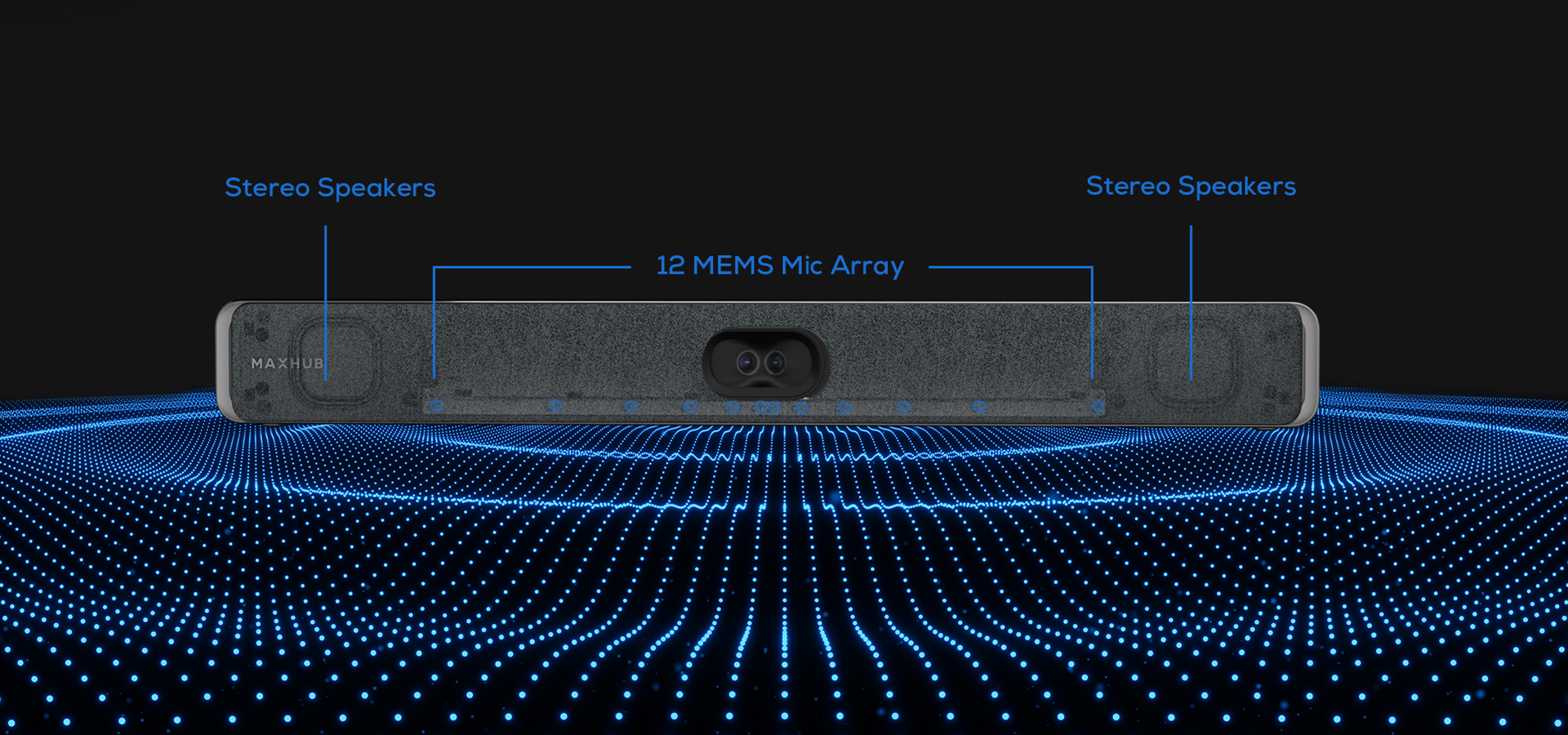
The videobar uses an array of 12 beamforming microphones. Beamforming means the system analyses the direction from which the voice is coming and focuses on it. Reflections from the walls that arrive from other angles are suppressed by the algorithm. AI noise reduction then filters steady background noise such as air conditioning, computer hum or traffic outside the window.
In practice, the result is as follows:
- Up to 6 metres: the far side hears you clearly, without wall reverberation, even in a room with glass partitions.
- Above 6 metres: audio quality from the farthest seats starts to drop. The voice remains intelligible, but reflections mix in more strongly and it becomes noticeable that the speaker is “far from the microphone”.
- Above 8 metres: the U50 is no longer the right choice. Larger meeting rooms require a system with multiple microphones or a higher-category USB videobar with support for external microphones.
Practical consequence for the buying decision:
Acoustics are an item that is usually not discussed. A €1,500 video conferencing bar in a room without acoustic treatment sounds only slightly better than a €100 system. If your meeting room has glass partitions or bare concrete walls, acoustic panels or curtains should also be considered. An investment of €500-1,500 into acoustics often delivers a bigger jump in call quality than replacing the system with a more expensive model.
For the U50, a simple rule applies: if the room is up to 6 metres long and has at least some soft surfaces (carpet, upholstered chairs, curtains or acoustic panels), beamforming and AI noise reduction can handle it without additional treatment. If the room is entirely glass and larger, acoustic intervention should be considered regardless of the videobar brand.
Video: what you get from 100 megapixels
The marketing description of the U50 refers to a 100MP camera system. In practice, this means two 50MP lenses working together. One captures the whole room through a 125° horizontal angle, while the other works with detail in a narrower field of view.
Why this matters:
The vast majority of video conferencing cameras have 4K resolution (8 MP) through a single lens. When such a camera digitally zooms in on a person at the back of the room, only a small crop remains from the original image. The result is a blurred, noisy picture – the kind of effect you know from security cameras.
Thanks to its dual-camera system, the U50 has enough pixels for the digital crop of a specific speaker to remain sharp. This is the technical foundation for three AI functions:
- Auto Framing: the camera automatically adjusts the shot so that all participants are visible. When someone enters or leaves the room, the framing adapts.
- Speaker Tracking: the camera focuses on the person currently speaking. During a discussion with several people, it gradually switches between speakers.
- Intelligent Focus: it captures a specific detail, such as a whiteboard or presenter, and keeps it sharply framed.
These functions can be switched on or off through the MAXHUB Align application, depending on whether you prefer a dynamic shot or a fixed view.
WDR and working with light:
Wide Dynamic Range (WDR) allows the camera to display darker and brighter parts of the image at the same time. When you sit with a window behind you, a standard webcam shows you as a dark silhouette against a bright background. The U50 balances brightness so that your face remains visible even in this situation.
Limits: WDR cannot overcome physics. If direct unshaded sunlight is behind you through a glass wall at 2 p.m. in summer, even a professional camera will not solve it perfectly. The solution is in the room itself: either use vertical blinds or reposition the table so that the window is to the side, not behind the speaker.
Practical consequence:
When buying a videobar, it is not enough to look only at the resolution in marketing materials. The same “4K” devices can deliver dramatically different quality depending on how they handle light and compensate for digital zoom. In this respect, the U50 belongs among the better-equipped devices in its price category, mainly thanks to its dual-camera architecture, which most competitors in the €1,000-1,500 segment do not have.
Weaknesses and limits in one overview
For quick orientation, here are the limits discussed in the sections above, summarized in one place:
- Without a laptop, the room is not “ready”. The U50 always runs from a laptop (your own or a dedicated PC in the room). The workflow “tap the tablet and the meeting starts” belongs to a Room System, not BYOD.
- Meeting quality depends on the laptop. A weak processor, undersized USB port or old drivers may lead to stuttering video or audio dropouts.
- No wireless sharing as standard. The connection is always wired. Wireless sharing for guests must be added as a module or by choosing a MaxHub CMA display.
- Reliable microphone range up to 6 metres, maximum 8. Larger meeting rooms and boardrooms require a system with multiple microphones or a higher MaxHub model, such as XBar V50 or V70.
And one limit we have not discussed yet:
No integration with room booking systems.
Full Room Systems can be connected to Microsoft 365 calendars, Google Workspace through services such as Robin or Joan, or native Teams Rooms. The display outside the meeting room shows the current booking, the meeting starts automatically according to the schedule, and the room reports into a central dashboard showing where people actually met and where the room stayed empty.
The U50 does not handle this without additional accessories. A person still starts the meeting manually from a laptop. With 5-10 rooms, this is not a problem. With 15+ rooms and an effort to optimize space utilization, without a Room System you lose an information layer that helps the CFO and facility manager decide whether to expand office space or reduce rent.
How much a complete MaxHub U50 solution costs
The MaxHub U50 videobar itself is available from MediaTech for €1,141 excluding VAT.
A functional solution, however, is not just a box on the wall. For a medium-sized meeting room for 6-10 people, the following must be added to the videobar price:
- Installation and cabling (mounting, cable routing, connection points in the table)
- Optional USB-C docking station for a “one cable” workflow
- Optional wireless module for guest screen sharing
- Acoustic treatment, if the room is dominated by glass and hard surfaces
- Display (commercial class, not a consumer TV)
The total budget for a functional BYOD meeting room with U50 typically ranges from €2,500 to €5,000 excluding VAT, depending on the condition of the room and the level of comfort you choose.
A full Room System in the same room starts at €4,000-6,000 plus monthly licence fees of €36-50 for Microsoft Teams Rooms or Zoom Rooms.
A detailed 5-year TCO calculation, including hidden costs such as IT labour time, service and hardware replacement cycles, is available in our video conferencing room pricing guide.
Conclusion: who the MaxHub XBar U50 is right for
The question from the beginning of this article was: BYOD or Teams Room? The MaxHub XBar U50 is the answer for those who have chosen the BYOD path and want higher-series quality within this category.
The U50 makes sense if:
You have a meeting room for 4-10 people, your people primarily work with laptops, you do not plan to tie the solution to a specific platform (Teams or Zoom), and you do not want to pay monthly licences. You get one of the best-equipped videobars in its price category, with a dual camera, 12-microphone beamforming array, AI functions and cloud management through MAXHUB Align. A functional setup including display and installation costs €2,500-5,000 and reliably lasts 5 years.
Where the MaxHub U50 is stronger than the competition:
The dual-camera architecture with 100 MP resolution is unusual in this price category. Most direct competitors use a single 4K camera. This means that when the U50 digitally zooms in on someone at the back of the room, the image remains sharp, while single-camera systems start to look grainy.
For rooms with a variable number of participants, this is a practical difference the far side of the call can see.
Where the MaxHub U50 is weaker than alternatives:
It is not certified as “Teams Rooms” or “Zoom Rooms” in the sense of a Room System. But that is not a defect, because it is not in that category. For the BYOD scenario it was designed for, this is more of an advantage, because it works with all platforms. The real limit is microphone range for rooms longer than 8 metres, where a higher category is required.
What to do next
After reading this article, you are probably in one of three situations:
You know you want BYOD and the U50 seems like the right choice. Send us the room dimensions, the number of people who meet there and a photo of the interior. We will prepare a specific quote including installation and recommendations for the display and acoustic treatment. We typically respond within 24 hours.
You are not sure whether to choose BYOD or a Room System. We recommend starting with a free consultation. We will look at how your people actually start meetings, how many meeting rooms you plan to equip and what your 5-year horizon is. After a 30-minute discussion, you will know which path fits your situation.
You are dealing with a larger installation (5+ rooms). For projects with more than five meeting rooms, we perform an audit of the existing IT infrastructure, an acoustic site inspection and prepare a technical specification that you can use in an RFP/RFQ. The audit is not tied to a purchase from us.
Contact: mediatech@mediatech.sk | +421 220 999 700