Implementing a video conferencing system: Uncovering hidden risks and common mistakes
Reading time: 4 minutes
Quick Summary
Successful video conferencing room integration does not depend on the lowest hardware price, but on the readiness of the physical infrastructure (acoustics, lighting, cable routes) and network security (LAN/VLAN).
If the design ignores the total cost of ownership (TCO), the result will be an unreliable system that employees will refuse to use.
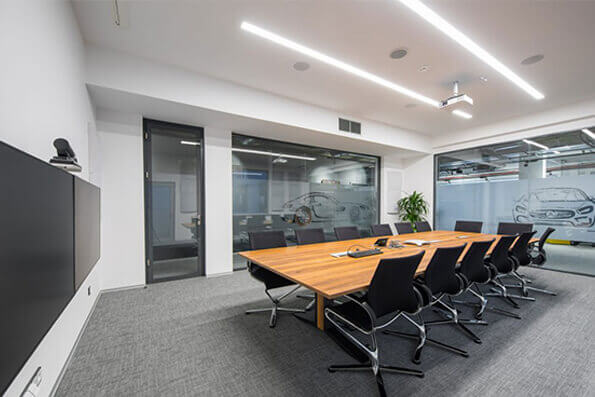
When setting up a corporate video conferencing room, management’s attention is often focused solely on the big screens or cameras. Purchasing hardware component by component without regard to overall compatibility typically results in a disparate collection of devices. Instead of a functional whole, the result is a system that doesn’t communicate reliably, ignores space constraints, and increases IT department service hours.
The following guide reveals 4 key areas of professional AV integration that integrators encounter as early as the design phase of a project.
Why won’t expensive technology solve bad acoustics and lighting?
The sound and lighting equipment of an office must be based on the physical properties of the room. The best results are achieved if an AV consultant is called into the project before the furniture is installed and the rough construction is done.
- Reverberation time and room acoustics: Even the best ceiling microphone with digital filtering will not eliminate sound reflections from glass partitions. In a professional design, the reverberation time (RT60) is measured in advance and acoustic absorbers are implemented into the interior. Without this adjustment, the spoken word captured is often unintelligible to the other party.
- Shading and unwanted light: Sharp backlight from windows turns people in front of the camera into dark silhouettes. A designer spotlight on the ceiling casts unnatural shadows on faces. This shortcoming can be avoided by systematically linking diffuse front lighting with automated control of window blinds.
- Cable management and table typology: Classic rectangular seating often blocks participants’ view of the camera and creates uncomfortable bundles of USB cables on the floor. Trapezoidal “V”-shaped tables and secure installation of cable routes directly into floor boxes reliably solve this situation.
The details that should be resolved before the design stage are explained in our article on seven details before designing a video conferencing room.
Acoustic preparation and a stable cable topology will survive several generations of displays in the company. Saving on infrastructure disproportionately increases long-term costs.
What are the risks of choosing the wrong AV hardware?
Purchasing common consumer technology for conference purposes has a direct impact on the warranty and quality of operation.
Professional LFD panels vs. home TV
Classic televisions have high-gloss panels that generate glare in conference rooms. Moreover, their use in a corporate environment voids the warranty. For corporate purposes, professional displays (Large Format Displays) are used, designed for continuous load without the risk of static image burn-in.
Which technology belongs in which type of room is covered in our AV technology configuration guide.
Optimal camera shooting angle
In small conference rooms (huddle rooms), ultra-wide-angle optics with a field of view (FOV) of at least 120° are a proven choice. On the contrary, PTZ (Pan-Tilt-Zoom) cameras equipped with AI automatic smooth shooting and focusing of the active speaker (auto-framing) are used in large conference rooms.
Hardware Audio DSP Processor
Systems without dedicated network and audio infrastructure cannot provide smooth two-way audio transmission (Full-Duplex). High-quality, stable transmission is ensured by a DSP unit that actively suppresses echo through a built-in AEC filter and processes sound from ceiling microphones with beamforming technology.

Why is the corporate IT network a critical point for video conferencing?
The hardware installed in the sample will only start to perform its function 100% by flawlessly integrating it into the existing corporate infrastructure.
Transmission security and connection stability
Smooth 4K images cannot be stably ensured commercially by relying only on the corporate Wi-Fi network.
A certified installation uses a fixed Ethernet connection with a separate secure VLAN layer created and configured in the corporate firewall. In addition, modern solutions adhere to a strict encryption policy according to ISO 27001 standards and authentication using the 802.1x standard.
Account management and mass updates
Basic free licenses in meeting rooms generate outages and disconnections from accounts. Reliable meeting systems use certified licenses (such as Microsoft Teams Rooms Pro) registered in the calendar as a “Resource account”.
Central IT management also automates system updates at night, eliminating common morning system outages when starting work on Mondays.
Further hidden causes of hybrid meeting failures are discussed in our article on why video conferences fail.
How to ensure that employees actively use new technology?
Investment in technology loses its meaning if staff refuse to use the functions of a modern meeting room due to the complexity of operation.
- Management adoption plan: Experience shows that including a targeted training and adoption plan (Adoption Plan) in the handover of the work significantly increases the confidence of users when organizing meetings and eliminates technical stress.
- Choosing an integrator according to global standards: When modernizing multiple branches, connecting with elite suppliers from an installation alliance such as the PSNI Global Alliance ensures consistency of delivery. This verifies compliance with strict design and acoustic standards (AV9000 standard), thus ensuring uniform intuitive operation and the same user experience from a single point of contact from anywhere in the world.
Summary
A successful video conferencing room is not a random collection of cheap cameras and displays from the electronics store. It is a strategically designed ecosystem where visuals, two-way audio, and cybersecurity work together to serve your employees without generating IT support tickets.
By assessing the physical and acoustical limits of the space in the design phase before the floor is poured and licensing secure, centralized devices on a separate corporate network, you avoid creating a costly “black hole” in corporate capital. Entrust your systems design to a certified AV integrator and ensure your return on investment (TCO) by prioritizing the user experience over the tabular parameters of purchased components.
The criteria for verifying an integrator’s quality are explained in our article on PSNI standards for medium-sized businesses.
Frequently Asked Questions
Why can expensive video conferencing equipment not compensate for poor meeting room acoustics?
Even the best ceiling microphone with digital filtering cannot eliminate the physical reflections of sound from glass partitions and hard surfaces. In a professional design, the reverberation time, or RT60, is measured before the furniture is installed, and acoustic absorbers are incorporated into the interior. Without this treatment, speech may remain difficult for remote participants to understand even when high-end hardware is used.
Why are standard consumer televisions not recommended for meeting rooms?
Standard consumer televisions use highly reflective glossy panels that create distracting glare in meeting rooms. When used in a commercial environment, the manufacturer's warranty may no longer apply. Professional large-format displays are designed for continuous operation for 16 to 24 hours per day and reduce the risk of image retention caused by static content.
Why is the corporate IT network critical to video conferencing stability?
Smooth 4K video cannot be guaranteed reliably over a standard corporate Wi-Fi network. A dependable installation uses a wired Ethernet connection with a separate VLAN and appropriate firewall configuration. The transmission is encrypted, and devices are authenticated using the 802.1X standard.
What is the difference between a free licence and a Pro licence for meeting rooms?
Basic or free licences may lead to account disconnections and unreliable meeting room operation. Dependable meeting room systems use certified licences such as Microsoft Teams Rooms Pro and are registered in the calendar as resource accounts. Centralised IT management schedules automatic updates during overnight maintenance windows, reducing the risk of disruptions when employees begin work in the morning.
How can a company ensure that employees actually use new video conferencing technology?
Including a training and adoption plan in the project handover increases user confidence and reduces technology-related stress. When several offices are being modernised, working with an integrator that follows consistent design and acoustic standards helps ensure that rooms operate in the same way across all locations.