Hybrid meeting room: 3 common scenarios and the right solution for each
Reading time: 4 minutes
Hybrid meetings rarely fail completely. Much more often, they simply perform poorly. Remote participants are difficult to hear, their faces are not clearly visible, and connection issues occur from time to time.
Over time, participants begin to accept this as normal. That is exactly why companies often remain unaware of the problem. Inside the room, nothing appears to be broken, so there is nothing obvious to report, while remote participants rarely raise the issue directly.
When a company decides to properly equip its meeting room, it quickly discovers that there is no universal solution.
What a room needs depends less on the number of seats and more on how the team actually works. Do participants bring their own laptops? Should the room operate independently? How large is the space that needs to be covered with high quality audio and video?
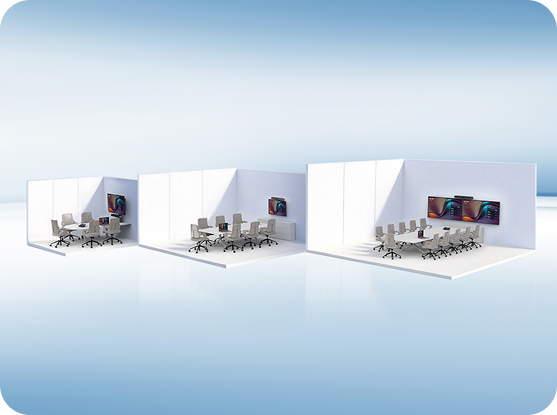
The following three scenarios cover the vast majority of corporate meeting rooms. Each includes a recommended solution along with an indicative price, making it easy to identify the option that best fits your needs.
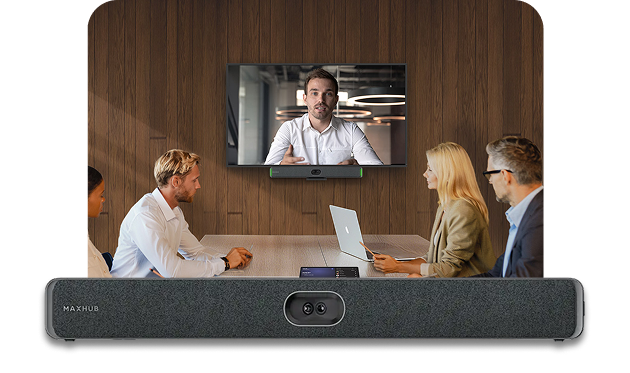
The common denominator across all three scenarios is the video bar – an all in one device that combines a camera, microphones, and speakers into a single unit mounted beneath or above the display. It replaces the traditional setup of a separate webcam, a tabletop microphone, and external speakers with a single integrated solution.
Scenario 1: Small meeting room where everyone brings their own laptop
This is the most common setup in smaller companies. A meeting room for four to six people where meetings are organized on demand. The room does not need its own dedicated conferencing system. Whoever leads the meeting simply connects their laptop and starts the call.
The MAXHUB XBar U50 is designed for this scenario. It connects to a laptop using a single USB cable, with no software installation or configuration required. It features a dual lens camera with a 125° field of view that captures the entire table, twelve microphones with an eight meter pickup range, and built in speakers. For a small meeting room, it provides everything needed for high quality hybrid meetings.
The MAXHUB XBar U50 is priced at €1,141.00 excluding VAT. It is the most affordable model in the range and, for companies with a single small meeting room that want a simple plug and play solution, it is typically more than sufficient.
The limitation of this setup is that every meeting depends on a connected laptop. As long as the room is used for informal or ad hoc meetings, this works perfectly well. However, if you want the room to operate independently without requiring anyone to bring a computer, you belong in Scenario 2.
Scenario 2: A meeting room that operates independently
In this scenario, the company has different requirements. The meeting room is used frequently, and connecting a laptop for every meeting becomes inconvenient. It either slows things down, or the required laptop is simply not available. The company wants a room with its own Microsoft Teams connection, allowing meetings to start directly without relying on a personal computer.
The MAXHUB XBar V50 Kit is designed for this type of environment. It is a video bar with a built in Android operating system that gives the meeting room its own dedicated identity in Microsoft Teams. The kit also includes a tabletop touch controller. Participants simply tap the controller to start the meeting.
This solves a situation that many companies know well: the first five minutes of every meeting being wasted trying to figure out how to start the call.
The MAXHUB XBar V50 Kit is priced at €2,537.00 excluding VAT.
Scenario 3: Medium to large meeting room
The third scenario is all about room size. A meeting room for 8 to 12 or more people, with a long conference table and a greater distance between the display and the far end of the room. Solutions from the first two scenarios reach their physical limits in this environment. A microphone with an eight metre pickup range cannot reliably capture participants at the far end of a long table, and a lower resolution camera cannot maintain clear facial detail for people sitting farther away.
The MAXHUB XBar V70 Kit is designed for this scenario. It belongs to a higher performance class. The camera features a four lens system with higher resolution, sixteen microphones provide audio coverage for spaces up to ten metres, and the built in speakers deliver significantly greater output.
Like the V50 Kit, it includes a touch controller, allowing the room to operate independently. Meetings start with a single tap, without requiring a participant’s laptop. The MAXHUB XBar V70 Kit is priced at €3,220.00 excluding VAT.
One important consideration for larger meeting rooms is acoustics. Larger spaces are often more acoustically challenging due to hard surfaces, glass walls, and long reverberation times. Even a high performance video bar has its limits. If the room has excessive echo, the audio quality will suffer regardless of how good the equipment is.
For larger meeting rooms, it is therefore worth evaluating the room acoustics in addition to selecting the right technology. This topic is covered in detail in our guide to video conferencing room costs, which also includes a breakdown of the total investment, including installation and any required room modifications.
Which solution is right for you?
| Scenario | Recommended solution | Price (excl. VAT) |
|---|---|---|
| Small meeting room, participants connect their own laptops | MAXHUB XBar U50 | €1,141.00 |
| Standalone meeting room with one tap meeting start | MAXHUB XBar V50 Kit | €2,537.00 |
| Medium to large meeting room | MAXHUB XBar V70 Kit | €3,220.00 |

Frequently asked questions
Does it work with platforms other than Microsoft Teams?
Yes. The devices are certified for Microsoft Teams, which ensures smooth and reliable performance in that environment, but they also work with Zoom, Google Meet, and other platforms. The U50 connects as a USB video bar to a laptop and works with whatever application you launch on it. If you are using a specific platform and want to verify compatibility details, feel free to contact us.
Do I need a display as well?
The video bar connects to a standard TV or display via HDMI. Most meeting rooms already have a screen in place. If your room does not have one, it is a separate item outside the video bar price. We can supply it together with the system if needed.
Is everything required for deployment included in the price?
The listed prices include the device with its standard accessories and mounting hardware. For “Kit” models, a tabletop touch controller is also included in the package. The price does not include any Microsoft Teams Rooms licenses, which are billed monthly for standalone meeting rooms. This topic, including cost breakdowns, is covered in our guide to video conferencing room pricing.
What if we install the system ourselves and cannot get it working?
The XBar series video bars are designed for easy deployment, and the U50 works immediately after connection. As an authorized distributor, MediaTech provides support for all devices. If you encounter issues during setup, you have a reliable point of contact. This is a key difference compared to purchasing an unknown brand without local support or service coverage.
Buy it yourself, or have it installed
The XBar series video bars are designed so that companies can deploy them on their own if needed. Installation is simple, and the U50 works immediately after connection. If you have an in house IT team and are equipping a single small meeting room, you can order the device directly via zvuk.sk and handle the setup internally.
If you do not have internal IT support, or you are equipping multiple rooms at once, or you have a larger meeting room where acoustics and placement need to be considered, MediaTech will handle the installation and configuration. In that case, you receive a fully operational meeting room where you only need to start the first meeting.
Let us know which of the three scenarios your meeting room fits into and we will come back with a concrete recommendation. If you already know what you need, you can order the device directly on zvuk.sk using the links above.